Major-based assessment · Report · Career workspace

See where the work you've donein your major can lead

CareerMatri's assessment is written for your major. It asks what you did in classes, assignments and projects, and which decisions were yours. Once your report is ready, you can keep adding experiences in your workspace and work toward your next step.

Did your school give you an ID? Log in and start

CareerMatri sample report screen: one area you can use in applications, three next steps, a table by area and a list of next steps
Sample report · answers of a mechanical engineering student who did a design capstoneOpen the full sample report

Summary

Where students get stuck before applying

  • Turning coursework and projects into lines for an application is hard
  • It is unclear which industries and roles a major actually leads to
  • Most assessments end with a single report and no next step

CareerMatri is A major-based career assessment that records what you have done as evidence and uses it to set your next step

Built per major

Each major has its own questions, written from the work people in that field actually do.

Evidence from experience

We ask what you did and what you decided yourself, not your aptitude or personality type, and show it back in the report.

A workspace that continues

After the report, adding an experience updates your current status and your next steps.

How it works

Assessment, report, then MAT for job postings

Three steps on one account.

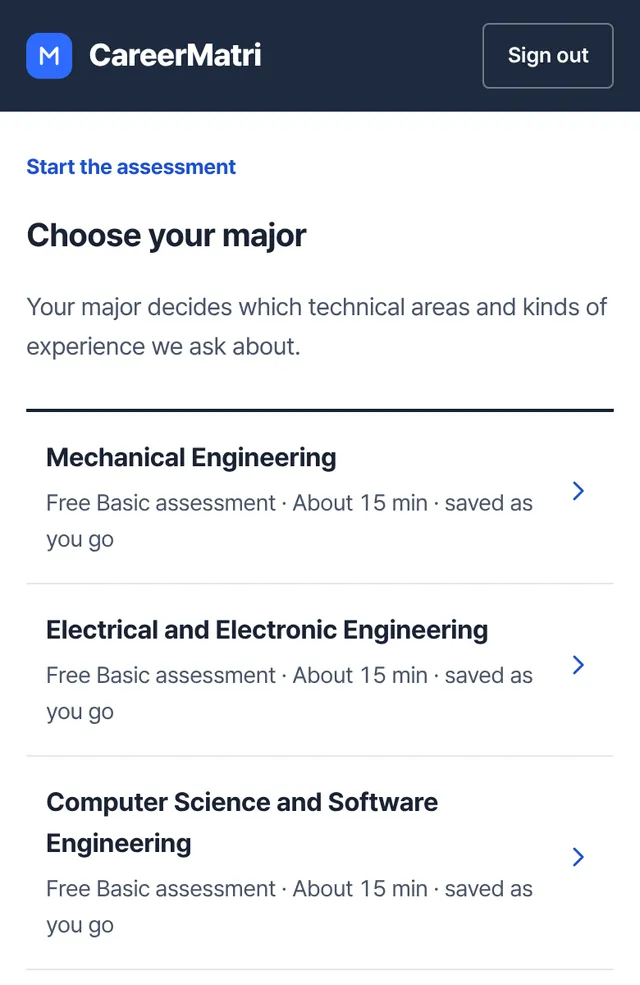
  1. Assessment start screen on a phone: choose your major, with three majors offered in English

    1

    Major-based assessment

    Choose your major and answer questions about what you did in classes, assignments and projects, and the decisions you made yourself.

    • Answers are saved as you go, so you can close the page and pick up later
    • Graduate students are asked about research situations
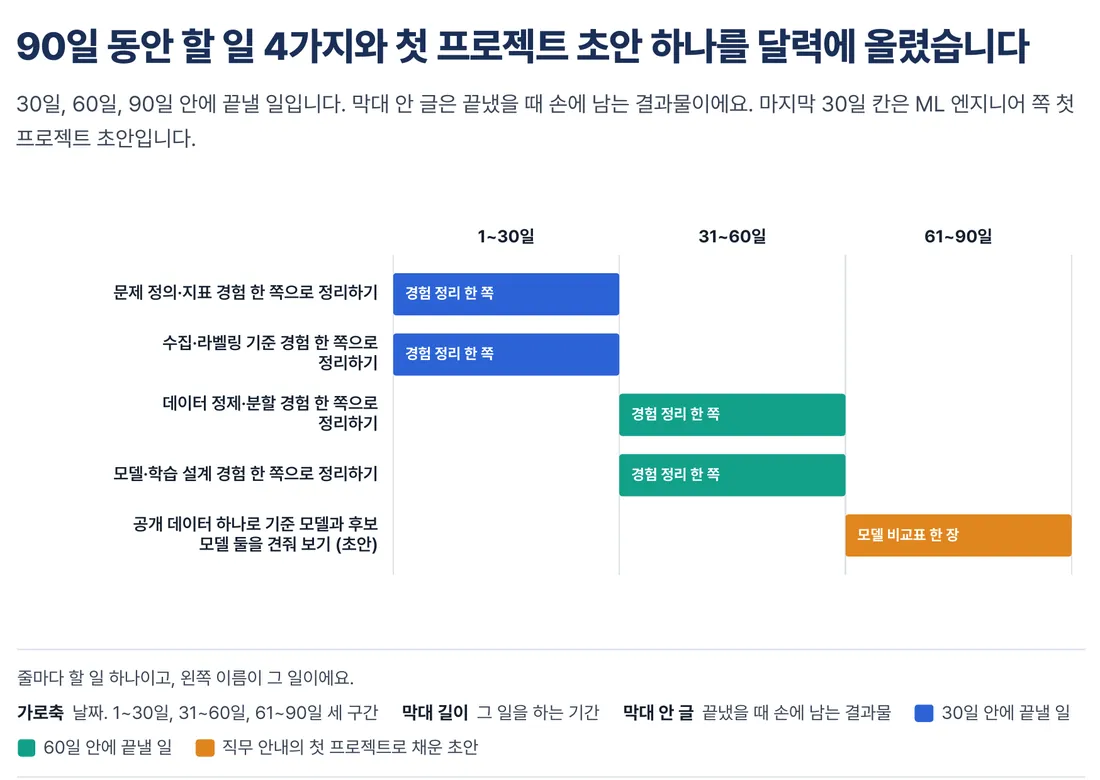
  2. A 90-day plan page from the PDF report (Korean): five tasks placed in 1–30, 31–60 and 61–90 day columns

    2

    Report (web and PDF)

    Read it on the web right away and download it as a PDF.

    • Areas you can use in applications, and gaps
    • Industries and roles your experience connects to
    • A plan with tasks and time frames
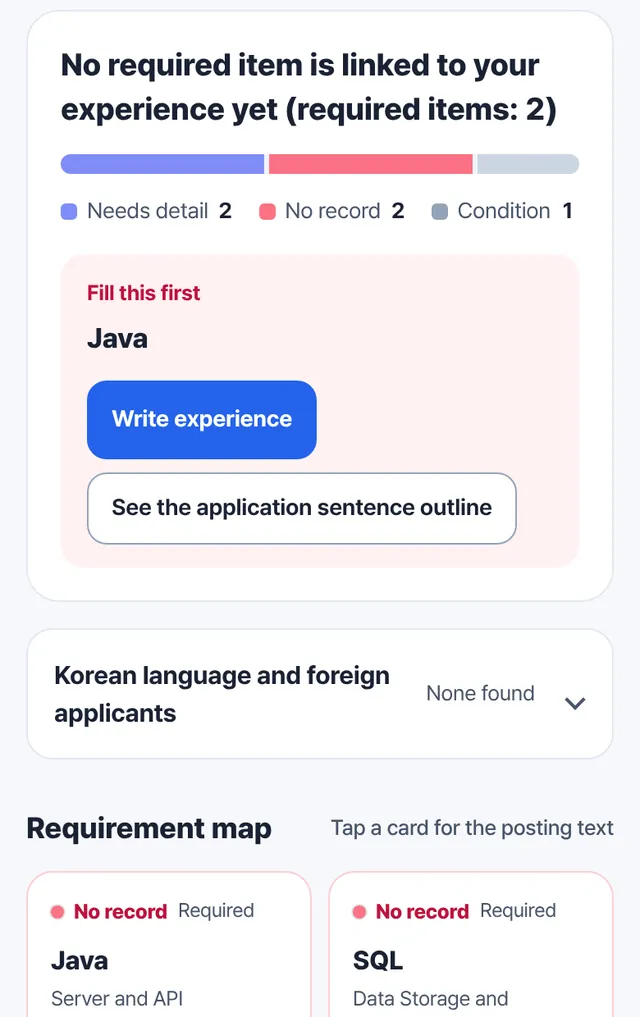
  3. MAT posting analysis screen: two required items, the requirement to fill first (Java) and the requirement map

    3

    MAT for job postings

    MAT compares your experience with each requirement of a posting and shows which requirement to fill first. Your first posting analysis is free.

    • Each requirement marked as explainable, needs detail or no record
    • Application sentence outlines and likely interview questions

Report

What the report includes

Everything in the report comes from your answers. The sample report opens without logging in.

The report gives no aptitude labels, hiring predictions or rankings. How much detail you get depends on the tier.

Open the sample report

Results summary
Confirmed experiences, the areas to look at first, and your next step, all on the first screen.
What you can already show
What you did, the decisions you made and the work you produced, side by side.
What to fill in next
Gaps listed by area, with a short note on why each one matters.
Industry and role links
The industries and roles where your confirmed experience is put to use.
Next steps
A concrete task to write up next, and what you will have in hand once it is done.
Application and interview drafts
A basic outline for your applications, built from the answers you gave.

Majors

Assessments for 20 majors, offered through school and institution contracts

Each major's questions are based on the work and decisions people in that field actually face. Department names vary from school to school, so we match each department to the closest major assessment.

Engineering and technology

  • Mechanical Engineering
  • Electrical and Electronic Engineering
  • Computer Science and Software
  • Architecture and Interior Architecture
  • Civil and Railway Engineering

Life sciences and health

  • Biotechnology and Life Sciences
  • Nursing
  • Health and Healthcare Welfare
  • Food
  • Sports and Exercise Rehabilitation
  • Horticulture, Forestry and Landscape

Business and social sciences

  • Business
  • Public Administration
  • Law and Policing
  • Psychology
  • Education

Humanities and arts

  • Korean Language, Linguistics and Literature
  • Media, Advertising, PR and Performance
  • Visual Arts and Design
  • Fashion, Beauty and Styling

Which majors are available depends on each school's or institution's contract. The assessment start screen shows the majors you can start now.

Find your major and start

Graduate students · Postdocs

One assessment from undergraduates to postdocs

Pick your degree stage on the first screen and the same major assessment asks about situations that fit that stage. From master's level up we also ask your field and undergraduate major, and use them to put your research into terms companies read.

What each stage adds

  1. Bachelor's

    What you decided yourself in coursework, capstone projects and internships

  2. Master's

    Research problems, measurement conditions, how you checked results, and putting them in industry terms

  3. PhD

    How you framed the problem, assumptions and variables, uncertainty and the limits of your work

  4. Postdoc

    The scope you led, running projects, calls you made on your own, and turning results into work

What the MAT research record does

  • Write your research record

    Papers, research projects, patents, equipment and methods, and degrees each have their own fields. Only you can see them.

  • Against posting requirements

    Next to each requirement line of a JobIndustry posting, MAT lists the research items that share terms with it.

  • Facts for your application

    Research items that match the requirements are collected so you can copy them into your application as written.

A higher degree does not raise your result by itself. The same answers give master's and PhD students the same result; statuses depend only on what you did and what you produced.

Start the assessment

Universities

Open the assessment by department and track progress on one screen

Staff issue student accounts and see progress and results by department. Students sign in through their school's own address and receive the same assessment and report.

Assessments by department
Each contracted department gets the assessment for its major.
Student accounts
Issue IDs and passwords one at a time, or all at once from a CSV file.
Progress and department totals
See how many students have started and finished in each department. Groups of fewer than 5 are not shown.
CSV export
Download rosters and progress as CSV for internal reports.

For individuals

You can use it without a school account

You can also sign up on your own. Assessment prices and current products are listed on the pricing screen in the CareerMatri app.

Assessment and report

Major-based assessment

When you finish, you get a web report and a PDF, and your CareerMatri workspace opens.

  • Prices and the differences between tiers are shown on the app's pricing screen
  • You can get a refund before you answer the first question

See pricing

Pass

MAT

Compares JobIndustry postings with your experience requirement by requirement, and drafts application sentences and likely interview questions. One posting analysis is free, with no assessment needed.

30 days ₩9,900 (≈ $7.36) · 90 days ₩24,900 (≈ $18.52) · Researcher 30 days ₩19,900 (≈ $14.80)In Korea: one-time payment · outside Korea: USD, renews until you cancelAmounts in brackets are estimates. You are charged in Korean won, and your card issuer converts it. Rate: 2026-11-24 (ECB).
  • In Korea, you are not charged again when the period ends
  • When you pay for a PRO report, MAT opens for 30 days with it

Learn about MAT

Common questions before you start

My school gave me an ID. Where do I sign in?

Use the address your school gave you, or the CareerMatri login screen, with the ID and password you received.

Open the login screen
Can individuals use it?

Yes. You can sign up on your own. Prices and current products are listed on the app's pricing screen.

See pricing
If I close the assessment halfway, do I have to start over?

No. Your answers are saved as you go, and you pick up where you left off when you come back.

How do I get my report?

When you finish, you can read it on the web right away and download it as a PDF. Log in any time to open it again.

Can graduate students and postdocs use it?

Yes. Choose your degree stage when you start and the assessment asks about situations at that stage. The report and MAT then focus on putting your research into job language. A higher degree does not raise your result.

Will I get a ranking or a hiring prediction?

No. We show the experiences confirmed in your answers, what is still missing, and what to do next.

Has the assessment completed its validation studies?

Not yet. The cognitive interviews and the pilot are not finished, so we do not call this a validated test. Treat the results as one input among others when making career decisions.

Start your first assessment in your major

Log in with the account your school gave you, or sign up as an individual.

CareerMatri | Major-based career assessment and career workspace